
JS Deobfuscation, Decoding, Requests
Whether you’re into pentesting, web development, or security analysis, knowing how to work with network requests and encoding methods is essential. This guide covers key cURL commands for HTTP requests, various encoding and decoding techniques like Base64, Hex, and Rot13, and a brief introduction to JavaScript obfuscation and deobfuscation.
🔐 JavaScript Obfuscation & Deobfuscation
JavaScript obfuscation is a technique used to make code difficult to read and understand, often for security or intellectual property protection. However, attackers also use it to hide malicious scripts. Deobfuscation helps reverse this process, making the code human-readable again.
🔹 Popular JavaScript Obfuscators:
- Obfuscator.io — Free online tool for JavaScript obfuscation
- javascript-minifier — Minifies JavaScript code to reduce size
- JSFuck — Converts JavaScript into highly obfuscated code
JavaScript Obfuscating is good for hiding scripts, yet it affects your code and can make it slower
🔹 Tools for Deobfuscation:
- JSNice — Tries to make JavaScript code more readable
- Prettier — Formats minified code into readable format
- Beautifier — Helps clean and structure messy JavaScript code
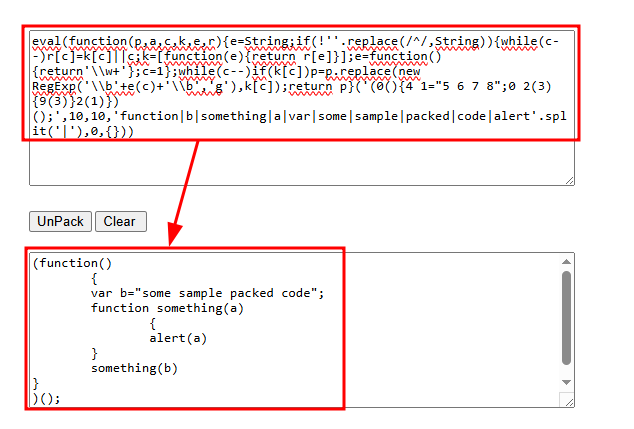
- UnPacker — Detects and unpacks JavaScript packers
Using these tools can help developers debug obfuscated code and identify potential security threats in scripts they encounter online.
🔍 Command Reference
cURL Requests
CommandDescriptioncurl http://SERVER_IP:PORT/cURL GET requestcurl -s http://SERVER_IP:PORT/ -X POSTcURL POST requestcurl -s http://SERVER_IP:PORT/ -X POST -d "param1=sample"POST request with data
Encoding & Decoding
CommandDescription`echo examplebase64`Base64 Encoding`echo ENCODED_B64base64 -d`Base64 Decoding`echo examplexxd -p`Hex Encoding`echo ENCODED_HEXxxd -p -r`Hex Decoding`echo exampletr ‘A-Za-z’ ‘N-ZA-Mn-za-m’`Rot13 Encoding`echo ENCODED_ROT13tr ‘A-Za-z’ ‘N-ZA-Mn-za-m’`Rot13 Decoding
🌐 Online Deobfuscation Tools
If you come across obfuscated code, these tools can help decode it:
🗂 Useful Debugging Commands
CommandDescriptionctrl+uView HTML source code (Firefox)ctrl+shift+iOpen browser DevTools
🔧 Example: Making a POST Request with cURL
$ curl -s http://SERVER_IP:PORT/ -X POST -d "param1=sample"
If you don’t need to send data, you can omit the -d flag.
🛠️ Encoding and Decoding Examples
Base64 Encoding & Decoding
$ echo "https://www.example.com/" | base64
# Output: aHR0cHM6Ly93d3cuZXhhbXBsZS5jb20v
$ echo "aHR0cHM6Ly93d3cuZXhhbXBsZS5jb20v" | base64 -d
# Output: https://www.example.com/
Hex Encoding & Decoding
$ echo "https://www.example.com/" | xxd -p
# Output: 68747470733a2f2f7777772e6578616d706c652e636f6d2f
$ echo "68747470733a2f2f7777772e6578616d706c652e636f6d2f" | xxd -p -r
# Output: https://www.example.com/
Rot13 Encoding & Decoding
Alternatively, use rot13.com.
$ echo "https://www.example.com/" | tr 'A-Za-z' 'N-ZA-Mn-za-m'
# Output: uggcf://jjj.rknzcyr.pbz/
$ echo "uggcf://jjj.rknzcyr.pbz/" | tr 'A-Za-z' 'N-ZA-Mn-za-m'
# Output: https://www.example.com/
🤖 How to Identify an Encoding Type?
If you’re unsure what type of encoding is used, try this tool:
🔎 Conclusion
These commands are incredibly useful for security professionals, developers, and anyone working in cybersecurity. If you found this guide helpful, share it with your network and save it for future reference!